Guide
Install the VeloPixels extension
VeloPixels isn't on the Chrome Web Store. You install it from the zip file in your purchase or free trial email, once, in about two minutes.
- About 2 minutes
- Chrome or Edge on desktop
- Windows or Mac
Before you start
- You bought the VeloPixels extension or started a free trial
- You have the email from [email protected] with your license key and download link
- You use Google Chrome or Microsoft Edge on a desktop computer
1Download and unzip
Click the download link in your email to get velopixels-extension-vX.Y.Z.zip. The link works for 7 days; after that, get a new one.
Unzip it into a folder you'll keep, for example Documents\VeloPixels on Windows (right-click the zip, then Extract All) or Documents/VeloPixels on a Mac (double-click the zip).
2Load it in your browser
- Open
chrome://extensionsin Chrome, oredge://extensionsin Edge (type it in the address bar). - Turn on Developer mode (top right in Chrome, left sidebar in Edge).
- Click Load unpacked and select the unzipped folder from step 1, the one that contains
manifest.json(not the .zip file). - VeloPixels appears in the list and opens its settings page in a new tab. Click the puzzle-piece icon in the toolbar and pin it.

3Add your license and Venice keys
- Use the settings page that opened after step 2. It starts with a short welcome checklist. If it didn't open, right-click the VeloPixels icon in the toolbar and choose Options.
- Under License Key, paste the key from your email (
VP-XXXX-XXXX-XXXX-XXXX) and click Activate. - Under Venice API Key, paste your Venice key and click Test connection. No key yet? Follow the Venice setup guide.
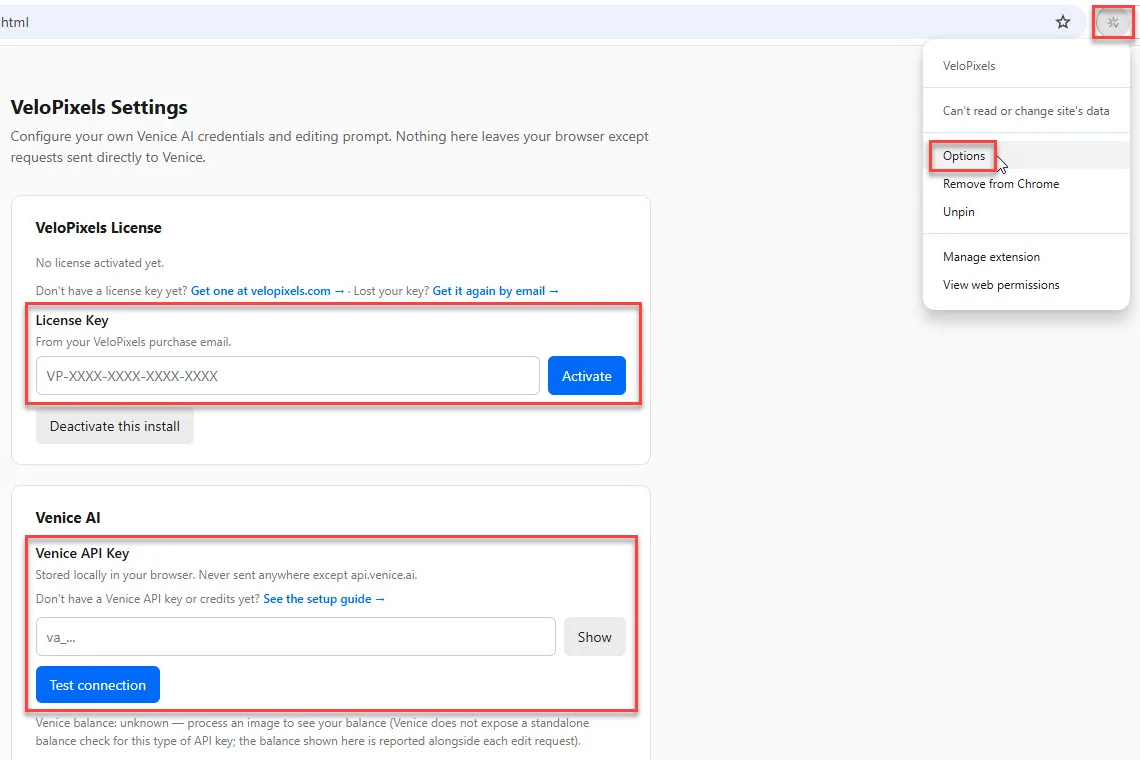
4Pick a model and write a prompt
- Next to Model, click Refresh. VeloPixels loads the Venice models that can edit images, with the price per edit. Pick one.
- Under Prompt text, describe the edit in plain English, for example
Remove birds on the photo. It's used for every photo you edit until you change it. - To reuse a prompt later, type a name for it and click Save as new.
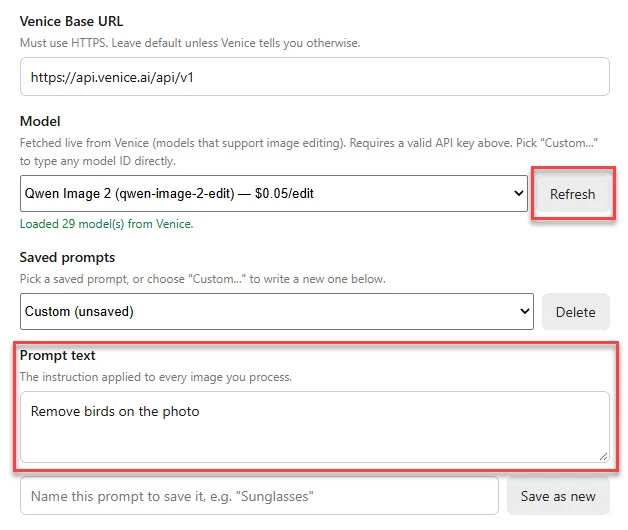
Now open instagram.com, hover a photo and click the AI button. The edited photo is saved to Downloads\VeloPixels (you can change the folder in Options).
Updating to a new version
When a new version is out (get the current zip any time from your keys page), unzip it over the same folder (replace the files), then click the reload icon on VeloPixels in chrome://extensions. Your settings, saved prompts and license stay as they are, and it doesn't use another activation. You can see your version number on the extensions page.
Moving to a different browser or computer? Click Deactivate this install in Options first, then activate on the new one. Each license works on 2 devices.
Check the file is genuine
Compare the file with the SHA-256 checksum of the current release. On Windows, open PowerShell in your Downloads folder and run:
Get-FileHash .\velopixels-extension-vX.Y.Z.zipOn a Mac: shasum -a 256 velopixels-extension-vX.Y.Z.zip. The value should match the checksum published for that version.
Troubleshooting
I dragged the .zip into the browser and nothing happened (or it says the package is invalid)
Load unpacked only lets me pick a folder, and I can only see the .zip
I don't see Load unpacked
It says “Manifest file is missing or unreadable”
manifest.json. If unzipping created a folder inside a folder, pick the inner one.The extension disappeared
My company computer doesn't allow it
Where do I paste my license key?
I can't find the email with my key
[email protected] and check the Promotions and Spam folders. Still nothing? Send it again with the same email address.